> For the complete documentation index, see [llms.txt](https://docs.klink.cloud/llms.txt). Markdown versions of documentation pages are available by appending `.md` to page URLs; this page is available as [Markdown](https://docs.klink.cloud/getting-started/setup-channels/custom-channel.md).
# Custom Channel
The **Custom Channel** allows you to connect **any third-party messaging platform** to **klink.cloud** using webhooks.
Once connected, messages from your system will appear in the **klink.cloud Unified Inbox**, and agent replies can be sent back to your platform automatically. Text and media messages (images, videos, audio, and files) are supported in both directions.
***
#### Where to Find Custom Channel
1. Go to **Settings**
2. Click **Message Integration**
3. Select **Custom Channel**
4. Click **Create / Setup Custom Channel**
***
#### How Custom Channel Works
Custom Channel uses **two webhooks**:
* **Outbound Webhook**\
klink.cloud → sends agent replies to your server
* **Inbound Webhook**\
Your server → sends customer messages into klink.cloud
Both are required for two-way messaging.
***
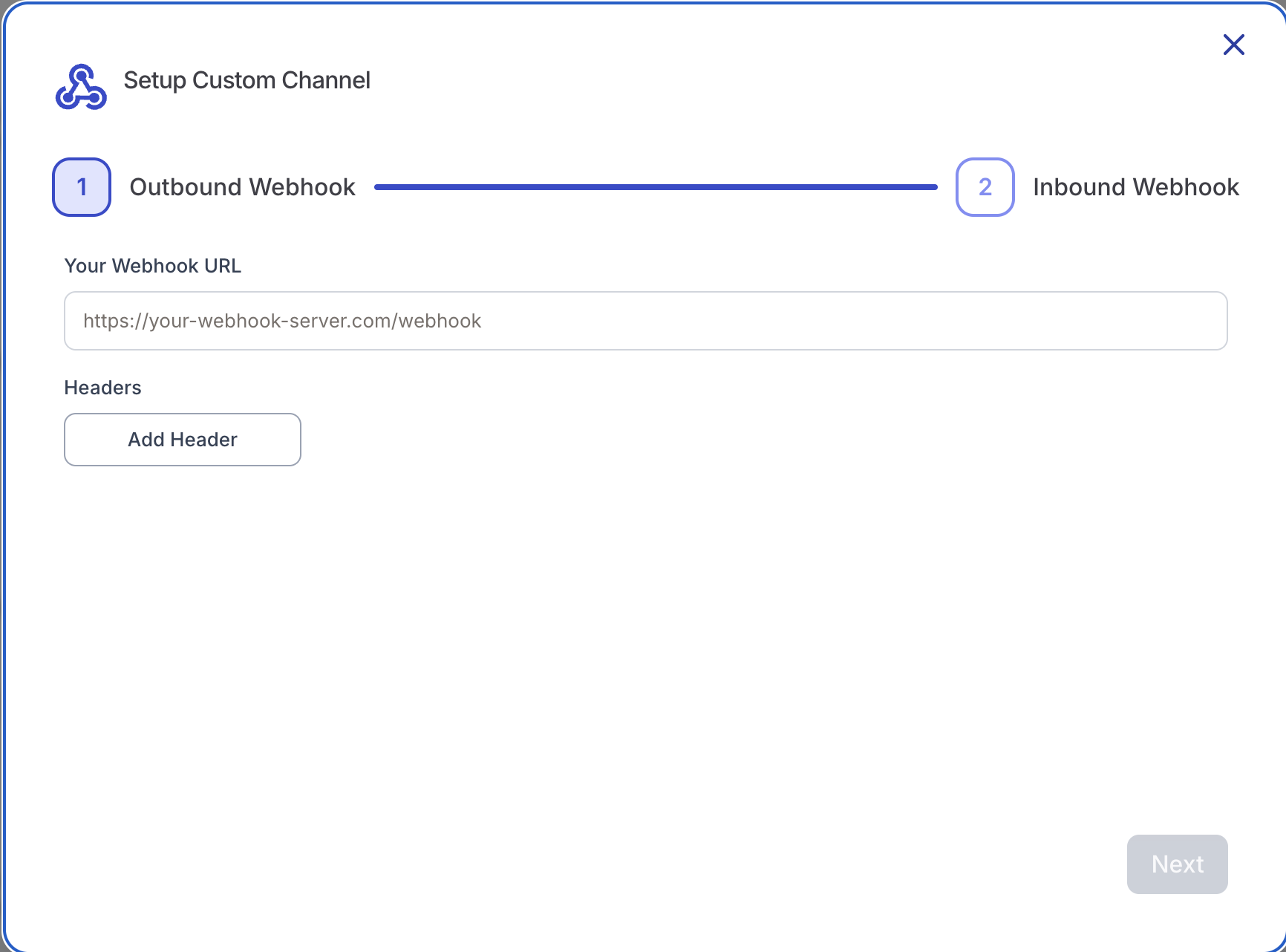
#### Step 1: Set Up Outbound Webhook
*(klink.cloud → Your System)*
This step allows klink.cloud to deliver agent replies to your server.
**Steps**
1. In **Outbound Webhook**, enter your server URL:
```
https://your-webhook-server.com/webhook
```
2. (Optional) Add headers if your server requires authentication:
```
Authorization: Bearer YOUR_API_KEY
```
3. Click **Next**
**What This Does**
Whenever an agent (or bot) replies in klink.cloud, the reply — text or media — is sent to your server in real time as an HTTPS POST request.
***
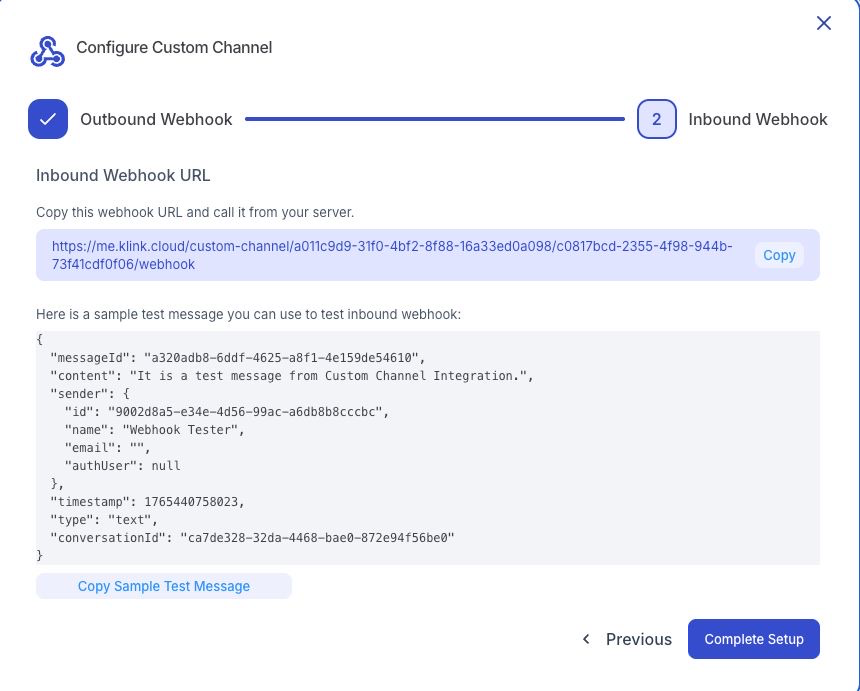
#### Step 2: Set Up Inbound Webhook
*(Your System → klink.cloud)*
This step allows your system to send messages **into** klink.cloud.
**Steps**
1. Copy the **Inbound Webhook URL** shown on screen\
Example:
```
https://me.klink.cloud/custom-channel/xxx/xxx/webhook
```
2. Use this URL in your backend or application to send messages to klink.cloud
3. Click **Complete Setup**
> 🔒 Keep this URL private. Anyone with this URL can send messages to your inbox.
***
#### Sending Messages to klink.cloud (Inbound Webhook)
**Endpoint**
```
POST {Inbound Webhook URL}
```
**Headers**
```
Content-Type: application/json
```
**Text Message**
```json
{
"messageId": "msg-001",
"content": "Hello from our custom platform",
"sender": {
"id": "user-123",
"name": "John Doe",
"email": ""
},
"timestamp": 1765440758023,
"type": "text",
"conversationId": "ca7de328-32da-4468-bae0-872e94f56be0"
}
```
**Field Reference**
| Field | Required | Description |
| ---------------- | ------------ | ----------------------------------------------------------------------------------------------------------- |
| `type` | ✅ | `text`, `image`, `video`, `audio`, or `file` |
| `conversationId` | ✅ | Your conversation identifier. Reuse the same value to continue a conversation; a new value starts a new one |
| `sender.id` | ✅ | Unique ID of the customer in your system |
| `sender.name` | ✅ | Display name of the customer |
| `sender.email` | Optional | Customer email |
| `content` | ✅ for `text` | Message text. For media types it is an optional caption |
| `timestamp` | ✅ | Message time in milliseconds since epoch |
| `messageId` | Optional | Your unique message ID. If omitted, klink.cloud generates one |
| `attachment` | ✅ for media | See **Sending Media Messages** below |
***
#### Sending Media Messages (Images, Videos, Audio, Files)
Media messages are sent inline as a **Base64-encoded attachment**.
```json
{
"messageId": "msg-003",
"content": "Optional image caption",
"sender": {
"id": "user-123",
"name": "John Doe",
"email": ""
},
"timestamp": 1765440900000,
"type": "image",
"conversationId": "ca7de328-32da-4468-bae0-872e94f56be0",
"attachment": {
"data": "data:image/png;base64,iVBORw0KGgoAAAANSUhEUgAAAAEAAAAB...",
"fileName": "photo.png",
"mimeType": "image/png",
"fileSize": 68
}
}
```
**Attachment Fields**
| Field | Required | Description |
| ---------- | -------- | ---------------------------------------------------------------------------------- |
| `data` | ✅ | File content as Base64 — either a raw Base64 string or a `data:;base64,` URL |
| `fileName` | ✅ | File name including extension (e.g. `invoice.pdf`) |
| `mimeType` | ✅ | MIME type (e.g. `image/png`, `video/mp4`, `audio/mpeg`, `application/pdf`) |
| `fileSize` | ✅ | Size of the **decoded** file in bytes — must exactly match the decoded Base64 data |
> **Important:** The maximum attachment size is **2.5 MB (2,621,440 bytes)** after Base64 decoding. Requests with a larger attachment, or where `fileSize` does not match the decoded size, are rejected with a `400` error.
***
#### Receiving Messages from klink.cloud (Outbound Webhook)
klink.cloud sends a POST request to your **Outbound Webhook URL** whenever an agent or bot replies. Your configured request headers are included on every call. Respond with a `2xx` status code to acknowledge delivery.
**Text Reply**
```json
{
"type": "text",
"conversationId": "ca7de328-32da-4468-bae0-872e94f56be0",
"channelId": "0196c8a1-1111-2222-3333-444455556666",
"userId": "user-123",
"content": "How can I help you?",
"messageId": "8f14e45f-ceea-4a7a-9f3a-1c1d2e3f4a5b",
"sender": {
"id": "agent-001",
"name": "Support Agent"
}
}
```
**Media Reply**
For `image`, `video`, `audio`, and `file` replies, the payload includes an `attachment` with a **download URL** instead of Base64 data:
```json
{
"type": "image",
"conversationId": "ca7de328-32da-4468-bae0-872e94f56be0",
"channelId": "0196c8a1-1111-2222-3333-444455556666",
"userId": "user-123",
"content": "",
"messageId": "9a25f56a-dffb-4b8b-8e4b-2d2e3f4a5b6c",
"sender": {
"id": "agent-001",
"name": "Support Agent"
},
"attachment": {
"url": "https://media.klink.cloud/…signed-url…",
"fileName": "photo.png",
"fileSize": 245120,
"mimeType": "image/png"
}
}
```
> **Note:** Attachment URLs are time-limited signed links. Download the file promptly (or forward the URL immediately) rather than storing the link long-term.
***
#### Testing the Integration
* Use the **Sample Inbound Payloads** provided in the UI (both text and image examples are included)
* Send them via Postman, cURL, or your backend
* Confirm the message appears in the inbox
***
#### Security Best Practices
* Always use **HTTPS**
* Use headers for authentication
* Do not expose inbound webhook URL publicly
* Validate all incoming requests
***
#### Supported Message Types
| Type | Inbound (to klink.cloud) | Outbound (from klink.cloud) |
| --------------- | ----------------------------- | --------------------------- |
| Text | ✅ Supported | ✅ Supported |
| Image | ✅ Supported (Base64, ≤2.5 MB) | ✅ Supported (signed URL) |
| Video | ✅ Supported (Base64, ≤2.5 MB) | ✅ Supported (signed URL) |
| Audio | ✅ Supported (Base64, ≤2.5 MB) | ✅ Supported (signed URL) |
| File / Document | ✅ Supported (Base64, ≤2.5 MB) | ✅ Supported (signed URL) |
***
#### Typical Use Cases
* Custom chat applications
* Internal company messengers
* AI bots & agents
* CRM or ERP messaging
* Legacy system integrations
***
#### Need Help?
* 📘 Documentation:
* 💬 Support: